01 · PROBLEM
Why do students switch to Reels?
TikTok is pushing into commerce with Shop, LIVE and more ads. I wanted to know how 18–24 year olds actually use the app day to day, what frustrates them, and where the shift toward shopping creates friction or erodes trust.
Scope: daily mobile users aged 18–34, focused on college students. Out of scope: creator monetization and US ownership and regulation.
02 · RESEARCH
7 interviews in two rounds
Round 1 (discovery): I recruited four college students in person (2 men, 2 women) for 10–15 minute one-on-ones. The guide had 19 core questions: when they open the app, which tabs they use, a time the feed felt spot-on vs. off, how they react to ads and Shop, and how TikTok compares to Reels and YouTube Shorts. I asked about real past moments, not hypotheticals, then tagged every frustration and grouped them into themes. Round 2: after building the MVP prototype, I interviewed 3 more NYU students and watched them use it (see the usability test below).
About 5 min a day. Her feed is already trained on Reels, so retraining TikTok "takes too much effort."
About an hour a day. Friend-shared videos throw off his feed, so he switches to Reels.
Ranks TikTok #1 and has an 800-day streak, but deletes the app when he overuses it.
Opens TikTok to search for specific videos. Says Instagram's results are often unrelated.
In their words
"My entire page becomes that."
Alex, 19 · after sending one video to a friend"Videos my friends send ruin my algorithm, so I switch to Reels."
Arthur, 19"My feed is already trained on Instagram. Retraining TikTok takes too much effort."
Tina, 18Recordings and full notes are kept private.
03 · FINDINGS
5 pain points
Across both rounds, I sorted frustrations into categories and kept the five that came up across interviews. Limited feed control sits closest to the core experience, watching the For You feed, so it ranked first.
- 1
Limited feed control
No quick way to correct what For You learns. One friend-sent video can skew the whole feed, so users jump to Reels.
- 2
Cluttered tabs
Users swipe into tabs they never use (STEM, Community, Shop) and can't hide them.
- 3
Repetitive, recycled videos
The feed repeats and recycles videos users have already seen.
- 4
Doom scrolling
Users overuse the app. Screen-time tools exist but are hard to find, so users delete the app or hide their phone.
- 5
Low-trust Shop and ads
Shop feels sketchy. Ads are tolerated at best, and one user would pay to remove them.
Where TikTok still wins: search. Students trust real reviews in videos and comments more than Instagram's results or Google. That's a strength worth protecting.
04 · SOLUTION
Feed Controls
I brainstormed with Crazy 8s and a mind map, grouped ideas by the pain point they solve, and scored them on alignment with what users asked for and TikTok's goal of keeping people engaged. Steering the algorithm won: it's the most pertinent problem and has the best pain-to-effort ratio. TikTok already has topic settings, but they're buried in Settings. Feed Controls brings them into the feed.
Interest ControlsMVP
Turn each interest up, down or off, even down to subtopics.
Friend Shield
One toggle stops friend-sent videos from changing your feed.
Topic Radar
Alerts you when one topic starts taking over your feed.
Ghost Mode
Watch without TikTok learning from it.
For daily users aged 18–24 whose feed fills up with videos they don't want, Feed Controls fixes a bad feed in seconds instead of days of tapping "Not interested." Unlike Reels, which only adds or removes topics, it sets how much of each topic you see.
05 · PROTOTYPE
Tune My Feed
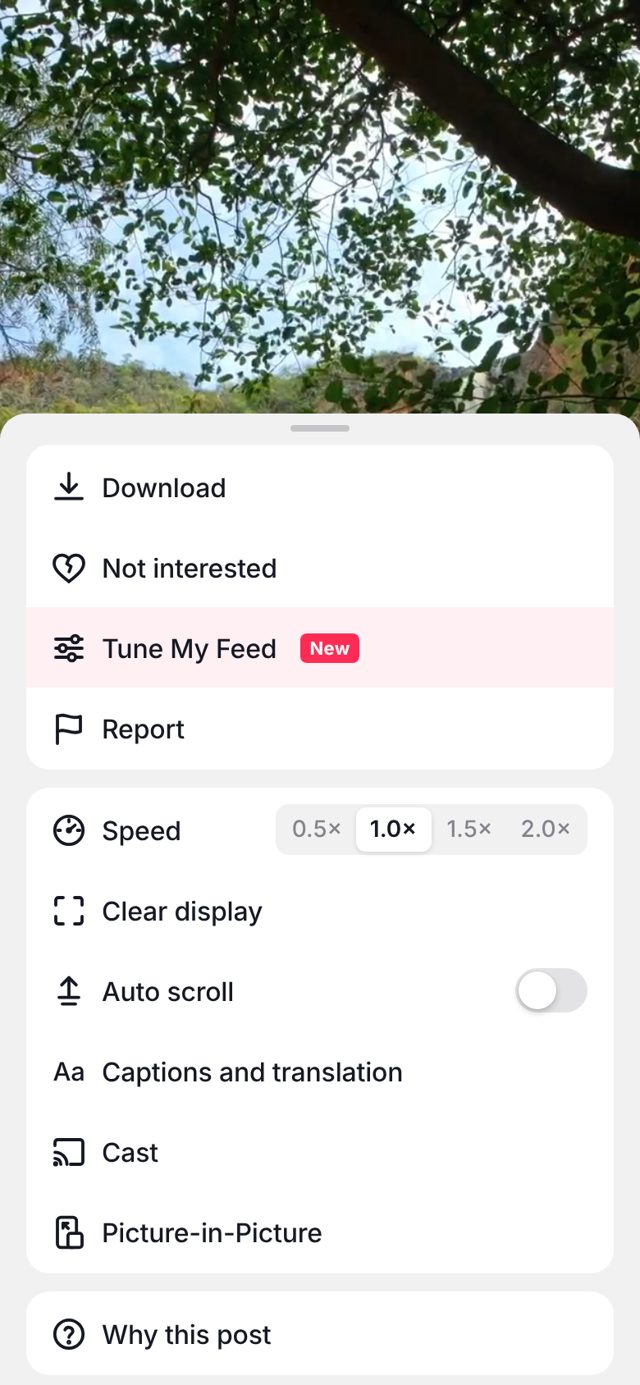
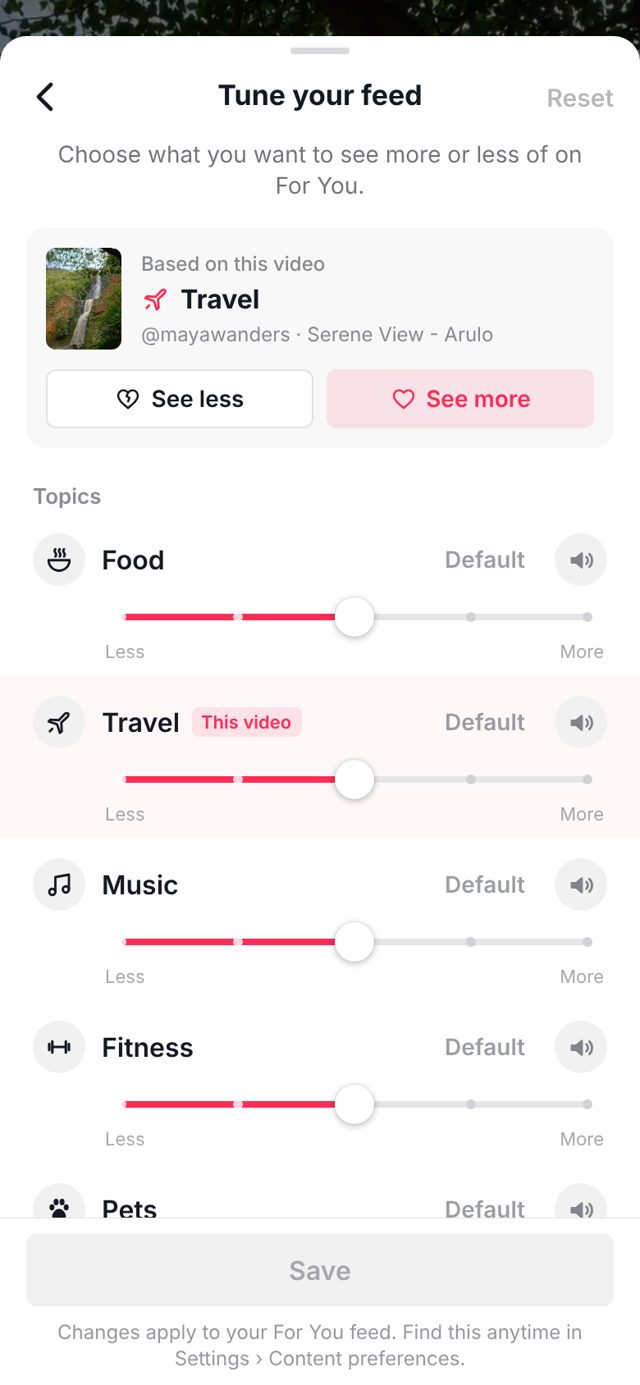
To test the MVP, I built a clickable TikTok-style app in plain HTML, CSS and JavaScript with 45 videos across 6 topics. The ranking is real: each slider sets a topic's weight, and the next videos re-rank the moment you save.
How it works
- Long-press a video, right where "Not interested" already lives.
- Tap Tune My Feed. It starts from the topic of the video you're watching.
- Drag each topic across 5 levels, or mute one entirely.
- Tap Save. The next videos reflect the change right away, with no retraining wait.
In a demo run, moving Food to "Much more" took it from about 1 in 10 upcoming videos to 5 in 10.
Usability test with 3 NYU students. 3 of 3 understood the sliders with no explanation. 2 of 3 picked the sliders as their favorite feature. Asked how he'd feel if the sliders were removed, Eli said "pretty sad."
06 · METRICS
How I'd measure success
| KPI | What it tracks | Goal |
|---|---|---|
| Adoption rate | % of weekly active users who change at least one setting in Tune My Feed | 15% of weekly users within 3 months |
| "Not interested" taps | Whether the feed actually gets better, since users spam this button when it drifts | 25% fewer taps per 100 videos |
| Frustrated exits | Sessions that end right after 3+ fast skips, the moment users give up on their feed | 20% fewer among Tune My Feed users |
| Retention rate | Users who tune their feed vs. those who don't, to prove it keeps people coming back | 3% more still active after 30 days |
07 · FEEDBACK
What reviewers pushed on
PM Club reviewers critiqued each week's work, and I pitched the final MVP to 7 product managers. Their feedback reshaped the metrics and the pitch.
They asked
- What does "alignment" mean?
- The KPIs overlap and only track watching
- Measure success, not just usage
- How will you know users leave for Reels?
- How does this bring in revenue?
I changed
- Defined it: fit with interview needs + engagement
- KPIs now cover adoption, feed quality, frustration and retention
- "Not interested" taps and frustrated exits show whether the feed gets better
- 30-day retention for users who tune vs. those who don't
- Tied it to the business model: ads earn from time on For You
08 · DECK
The presentation
09 · WHAT I LEARNED
What I'd do differently
Talk to more people
Seven college students surfaced clear themes, but that's a signal, not proof. Next time I'd run more interviews and add early-career users.
Record exact quotes
My notes were mostly summaries. Pulling verbatim lines from the recordings would make the findings more convincing.
Test with more people, for longer
All 3 testers found the sliders, but 3 is a small sample. Next I'd test with more users and measure whether the feed actually feels more "like them" after a week.
Check what already exists first
TikTok already has topic settings buried in Settings. Finding that early made the pitch sharper: the gap is discoverability, not the feature.
Independent student concept. Not affiliated with or endorsed by TikTok or ByteDance.